I built a Taildrop plugin for Omarchy
Send files to any machine on your tailnet with one keystroke
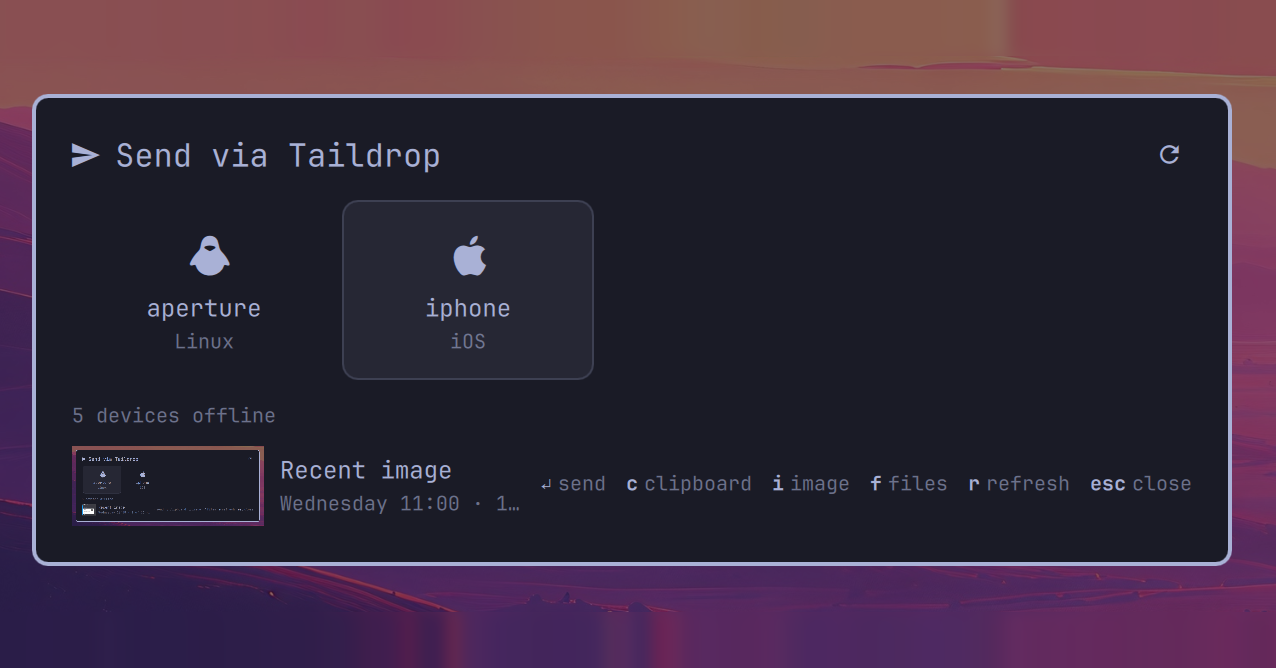
I built a Taildrop plugin for Omarchy. Press SUPER + SHIFT + T, pick a device, and whatever you had highlighted, copied, or selected lands on it.
Why
Omarchy ships with LocalSend, and on a local network it’s fine. But most of my machines talk to each other over Tailscale, and LocalSend doesn’t really get along with it. Devices drop out of the list, and I end up typing IP addresses to send a screenshot to my phone, which is not what I want from a “quick send” tool.
Tailscale already has a feature built for this. Taildrop sends files between devices on your tailnet. It already knows about every device, works across networks, and needs no pairing. On macOS it has a nice share-menu extension. On Linux you get tailscale file cp in a terminal.
So I built the share sheet I wanted.
What it does
There are two ways in:
SUPER + SHIFT + Topens the sheet with something already loaded: highlighted text if there is any, otherwise an image on the clipboard (a screenshot you just took counts), otherwise clipboard text.- Right-click files in Nautilus → Send with Taildrop opens it with those files loaded.
The footer shows what’s loaded, with a preview or thumbnail, so you can check before you send. Pick a device, hit Enter, done. If you want to send something else, a few keys swap it out without closing the sheet:
| Key | Loads |
|---|---|
c |
the clipboard, ignoring highlighted text |
i |
the latest image from Omarchy’s clipboard history (press again for older ones) |
f |
files, via the file chooser |
Only devices that can receive right now show up as tiles. The list refreshes while the sheet is open, so if you open Tailscale on your phone, it appears right away.
The plugin only sends. Omarchy already handles receiving: its omarchy-tailscale-receive service drops incoming files into ~/Downloads and sends you a notification.
Install
It’s in the Omarchy plugin directory, or:
omarchy plugin add https://github.com/ryenski/omarchy-taildrop.git --enable
The first time it loads, it sets up the Nautilus menu item and asks once, with a notification, whether you want the SUPER + SHIFT + T shortcut. If you ignore it, your keybindings stay untouched.
You’ll need Tailscale set up with your user as the operator (sudo tailscale set --operator=$USER) and Taildrop enabled on your tailnet. There are more details in the README.
Try it
The code is on GitHub under the MIT license. If you run Omarchy and Tailscale, give it a try, and open an issue if something breaks.